IT Support for Ottawa Nonprofits and Charities: Security on a Tight Budget
How Ottawa nonprofits, charities and NGOs can protect donor data and Microsoft 365 without overspending
Most of the security an Ottawa nonprofit needs is free or low-cost; the key is spending where the risk is highest. Turn on multi-factor authentication (MFA) for every account. Put finance, leadership and admin staff on Microsoft 365 Business Premium, and use the free Business Basic licences for everyone else. Add phishing training, a backup and a rule to confirm payment changes by phone. Together, these cover the most common ways charities lose money and data.
Written by Technety, an Ottawa-based managed service provider focused on Microsoft 365 security, for nonprofits, charities, not-for-profits and NGOs across Ottawa.
At a glance
- About one in five Canadian nonprofits with 10 or more staff reported a cyber security incident in a single year, the same rate as businesses.
- Microsoft retired its free Microsoft 365 Business Premium grant for nonprofits. Eligible organizations can still get up to 300 free Business Basic licences and discounted Business Premium.
- The free Business Basic licence does not include Microsoft’s advanced security features, so it pays to put higher-risk staff on Business Premium.
- Phishing and payment fraud are the most common threats to charities, and both are cheap to defend against.
- Non-profit status doesn’t automatically exempt you from Canada’s privacy law, and donors expect their information to be protected either way.
Are Ottawa nonprofits and charities really targets?
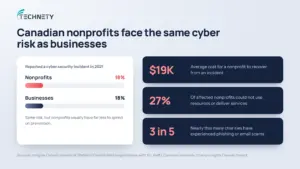
Yes. Canadian nonprofits are attacked as often as businesses, but usually have less to spend on defence.
By the numbers:
- 18% of Canadian nonprofits reported a cyber security incident in 2021, the same rate as businesses (Imagine Canada analysis of Statistics Canada data)
- $19,000 was the average cost to recover from an incident
- 27% of affected nonprofits said the incident stopped them from using resources or delivering services
- Nearly 3 in 5 charities have experienced phishing or email scams (Carleton University’s Charity Insights Canada Project)
Attackers rarely pick a charity by name. They send the same fake emails to thousands of organizations and wait for someone to click. Small teams, shared passwords and busy volunteers make nonprofits an easy target.
What changed with Microsoft 365 for nonprofits?
Microsoft retired its free Microsoft 365 Business Premium grant for nonprofits, so many charities lose their free advanced security at renewal.
Nonprofits used to receive up to 10 free Business Premium licences. Microsoft ended that grant for each organization at its first renewal on or after July 1, 2025. Eligible nonprofits can still get up to 300 free Microsoft 365 Business Basic licences, plus discounts on paid plans, including Business Premium.
Because the change happens at each organization’s renewal date, some Ottawa charities are only finding out now. If you haven’t checked yet, look up your renewal date in the Microsoft 365 admin center. Plan where each user will move before the old licences expire, so nobody loses access to email or files.
Which Microsoft 365 licence should a nonprofit use?
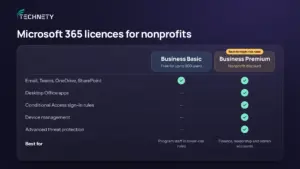
Use a mix: free Business Basic for most staff, and discounted Business Premium for the people who handle money, sensitive data or admin access.
| Business Basic | Business Premium | |
|---|---|---|
| Nonprofit price | Free for up to 300 users | Discounted |
| Email, Teams, OneDrive, SharePoint | Yes | Yes |
| Desktop Office apps | No (web and mobile only) | Yes |
| Conditional Access sign-in rules | No | Yes |
| Device management and advanced threat protection | No | Yes |
| Best for | Program staff with lower-risk roles | Finance, leadership, admins, anyone handling sensitive data |
Conditional Access lets you control who can sign in, from where and on which devices. Microsoft notes that Conditional Access requires an Entra ID P1 licence, which is included in Business Premium. On Business Basic, Microsoft’s free security defaults should be your minimum baseline.
What are the most important security steps for a nonprofit on a tight budget?
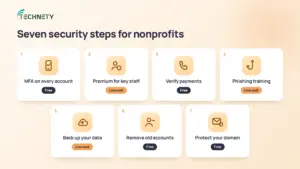
Seven steps cover the most common threats to charities, and most cost little or nothing.
| Step | What it protects against | Cost |
|---|---|---|
| Turn on MFA for every account | Stolen passwords | Free |
| Put high-risk staff on Business Premium | Attacks on finance and admin accounts | Low |
| Confirm payment changes by phone | Payment and invoice fraud | Free |
| Train staff and volunteers on phishing | Fake emails and scams | Low |
| Back up Microsoft 365 data | Deletion, ransomware, expired licences | Low |
| Remove access when people leave | Former staff and volunteer accounts | Free |
| Protect your email domain | Fake emails sent in your charity’s name | Free |
Turn on MFA everywhere. MFA blocks most password-based attacks, and the Canadian Centre for Cyber Security lists it as a foundational action for small organizations. Use the Microsoft Authenticator app, not text messages.
Protect the accounts attackers want most. Put your executive director, finance staff and anyone with admin rights on Business Premium.
Make payment verification a rule. Payment fraud often starts with an email that appears to come from a partner, supplier or your own executive director. Confirm any new or changed bank details by calling a known phone number, never the one in the email.
Train everyone, including volunteers. Imagine Canada found that only 17% of small nonprofits provide cyber security training to non-IT staff. Short, regular cybersecurity awareness training closes that gap, and insurers increasingly expect it.
Keep your own backup. Microsoft keeps deleted items for a limited time, but that isn’t a backup you control. Donor records, grant files and board documents deserve their own backup. Our article on Microsoft 365 security myths explains why.
Close accounts the day people leave. Nonprofits have high turnover across staff, contract workers and volunteers. Remove access promptly and move files somewhere shared. Our Microsoft 365 onboarding checklist covers what a clean process looks like.
Lock down your email domain. Set up SPF, DKIM and DMARC so criminals can’t send emails that appear to come from your charity’s address. This protects your donors as much as your staff.
Do privacy laws apply to Ottawa charities?
Often not PIPEDA, but your donors expect protection either way, and some activities do bring you under the law.
The Office of the Privacy Commissioner of Canada explains that non-profit organizations usually aren’t subject to PIPEDA because they don’t typically engage in commercial activities. But non-profit status doesn’t automatically exempt an organization. Selling, bartering or leasing donor, membership or fundraising lists counts as commercial activity under the Act.
If your organization operates in Gatineau or elsewhere in Quebec, Quebec’s private sector privacy law (Law 25) applies more broadly to nonprofits. If you provide health services in Ontario, PHIPA may apply. Whatever the law requires, a breach of donor data damages the trust your fundraising depends on.
What should IT support for a nonprofit include?
Look for a provider that understands nonprofit licensing, high turnover and tight budgets, not just general IT.
Questions to ask any IT provider:
- Have you helped nonprofits move off the old Business Premium grant?
- How do you handle accounts for volunteers and short-term contract staff?
- Can you give us predictable monthly pricing we can put in a grant budget?
- Will you report on our security in plain language our board can understand?
- How do you protect donor and beneficiary data?
Where Technety fits: Technety supports Ottawa nonprofits, charities and NGOs with Microsoft 365 and Google Workspace management, proactive IT support and cybersecurity awareness training. We help organizations get the most from Microsoft’s nonprofit offers and put security where it matters most. See the industries we serve.
What does this look like in practice?
The situation: A 20-person Ottawa charity learns its free Business Premium licences will expire at renewal. Upgrading everyone to paid Business Premium would strain the budget. Moving everyone to free Business Basic would remove the security protecting its finance team.
The decision: The charity puts its executive director, two finance staff and its IT administrator on discounted Business Premium. The other 16 staff move to free Business Basic. It turns on MFA for every account, adds a phone-verification rule for payment changes, and runs a short phishing session at its next staff meeting.
The result: Strong protection on the accounts attackers target most, at a fraction of the cost of upgrading everyone.
Frequently asked questions
Do nonprofits still get Microsoft 365 for free?
Partly. Eligible nonprofits can still get up to 300 free Microsoft 365 Business Basic licences. The free Business Premium grant has been retired, but Business Premium is available at a nonprofit discount.
Is the free Business Basic licence secure enough?
For many lower-risk roles, yes, as long as MFA and Microsoft’s security defaults are turned on. Staff who handle money, sensitive data or admin rights are better protected on Business Premium.
What happens when our Business Premium grant expires?
The grant ends at your first renewal on or after July 1, 2025. Before that date, move each user to Business Basic or a paid plan, so nobody loses access to their email or files.
Does PIPEDA apply to our charity?
Usually not, unless you engage in commercial activities such as selling, bartering or leasing donor lists. Quebec and other provinces have their own rules, and protecting donor data is essential either way.
How much should a small nonprofit spend on IT security?
It depends on your size and the data you hold. Start with the free steps in this guide, then put budget toward Business Premium for high-risk staff, training and backup.
Can NGOs and associations get the same Microsoft nonprofit offers?
Microsoft sets its own eligibility rules for its nonprofit program. Apply through Microsoft’s nonprofit offers page to confirm whether your organization qualifies.
Do we need cyber insurance?
It’s worth considering, especially if you hold donor payment data. Insurers increasingly expect basics like MFA and phishing training before they’ll cover you.
Not sure where your nonprofit’s Microsoft 365 setup stands?
Technety offers a free consultation for Ottawa nonprofits and charities. We’ll check your licences and security settings and tell you plainly what’s missing. Book your free consultation.
This article is general information, not legal advice.
Sources
- Imagine Canada: What newly available data tells us about cybersecurity in Canadian nonprofits
- Future of Good: Carleton University Charity Insights Canada Project findings on phishing
- Microsoft: Offers for nonprofits
- TechRadar: Microsoft ends free Business Premium licences for nonprofits
- Microsoft Learn: Plan for mandatory Microsoft Entra multifactor authentication
- Canadian Centre for Cyber Security: Foundational cyber security actions for small organizations
- Office of the Privacy Commissioner of Canada: How PIPEDA applies to charitable and non-profit organizations
Similar
Our newsroom highlights the milestones shaping Shipora and the markets we serve.