Managed IT Services Ottawa: How to Choose (2026)
Choosing managed IT services in Ottawa? Compare provider types, see what Microsoft and Canada’s cyber agency recommend, and use our 7-point checklist.
Quick answer
The best managed IT provider for an Ottawa small business is one that matches your size and can explain exactly how it secures Microsoft 365. Start by deciding which type of provider fits you. Then test each candidate with specific questions about security, response times and pricing. This guide covers managed IT services in Ottawa, Kanata, Nepean and Orleans. It explains the main provider types, the official security guidance that applies to Canadian businesses, and a seven-point checklist for choosing well.
About this guide: Technety, a Kanata-based managed service provider focused on Microsoft 365 security, wrote this guide. The advice is vendor-neutral, apart from one section that describes our own services.
Key takeaways
- Ottawa has dozens of managed service providers (MSPs), and most of them say they support Microsoft 365. The depth of that support varies a lot.
- Microsoft says multi-factor authentication (MFA) can block more than 99.2% of account compromise attacks, so ask every provider how they set it up.
- The Canadian Centre for Cyber Security lists MFA, automatic updates and data backups among the foundational security actions for small organizations.
- Canadian privacy law requires many businesses to report serious privacy breaches, so your IT provider’s security choices affect your legal exposure.
- Get pricing, response times and what is excluded in writing before you sign.
What is a managed IT service provider?
A managed service provider (MSP) is a company that runs and protects your IT for a monthly fee, instead of charging only when something breaks. A typical MSP handles help desk support, device updates, backups, security monitoring and Microsoft 365 administration.
Three terms come up often when choosing one:
- Multi-factor authentication (MFA): a sign-in that needs a second proof of identity, such as an app approval, on top of a password.
- Phishing-resistant MFA: MFA methods such as passkeys that cannot be captured by a fake login page.
- Conditional Access: Microsoft 365 rules that decide who can sign in, from where and on which devices, including work email on personal phones. Conditional Access needs Microsoft 365 Business Premium or an Entra ID P1 licence; on other plans, Microsoft’s free security defaults are the minimum baseline.
What types of IT providers are there in Ottawa?
Ottawa’s IT providers fall into five broad types, and knowing which one fits your business narrows the field quickly.
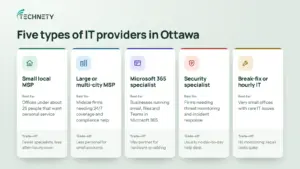
| Provider type | Best for | Trade-off |
|---|---|---|
| Small local MSP | Offices under about 25 people that want personal service | Fewer specialists and less after-hours coverage |
| Large or multi-city MSP | Midsize firms that need 24/7 coverage and compliance support | Less personal; a small business may be a small account |
| Microsoft 365 specialist | Businesses that run email, files and Teams in Microsoft 365 | May partner with others for hardware or cabling |
| Managed security provider (MSSP) | Firms that need threat monitoring and incident response | Usually does not handle day-to-day help desk |
| Break-fix or hourly IT | Very small offices with rare IT issues | No monitoring; costs spike when something breaks |
What do official sources say about small business IT security?
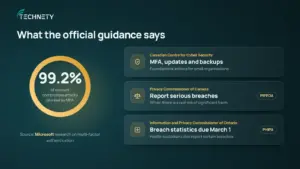
A good Ottawa MSP should already follow the guidance below, so it’s worth knowing before you compare providers.
Microsoft: Microsoft’s own documentation cites research showing MFA can block more than 99.2% of account compromise attacks. Since February 2025, Microsoft has been rolling out mandatory MFA for sign-ins to the Microsoft 365 admin center. MFA is essential, but it isn’t the finish line; our article on Microsoft 365 security myths explains how some phishing sites get around it.
Canadian Centre for Cyber Security: The Centre’s foundational security actions for small organizations include strong passwords with MFA, automatic software updates and regular data backups. It describes these as a minimum set of practices that small organizations can put in place over time.
Office of the Privacy Commissioner of Canada: Under PIPEDA, businesses must report breaches of security safeguards that pose a real risk of significant harm, notify the people affected, and keep records of all breaches.
Information and Privacy Commissioner of Ontario: Under PHIPA, health information custodians such as clinics must notify the IPC of certain privacy breaches at the first reasonable opportunity. They must also send annual breach statistics to the IPC by March 1.
In practice, this means a weak Microsoft 365 setup is not only an IT problem. It can turn one stolen password into a reportable privacy breach.
Where does Technety fit?
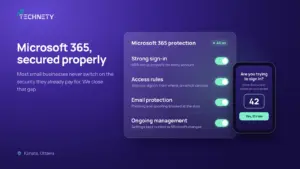
Technety is a Kanata-based managed service provider focused on Microsoft 365 administration and security for small and midsize businesses across Ottawa.
Most small businesses already pay for Microsoft 365 but never configure its security features. Technety’s work centres on closing that gap: setting up multi-factor authentication properly, tightening sign-in rules, protecting email and keeping the tenant managed over time.
Key details
- Location: Kanata, Ottawa, Ontario
- Best for: Small and midsize businesses in finance, legal, medical, construction, insurance and the non-profit sector (see the industries we serve)
- Core services: Microsoft 365 and Google Workspace management, proactive IT support and cybersecurity awareness training
How do you choose the right managed IT provider in Ottawa?
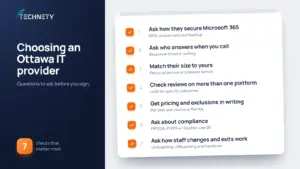
Start with your biggest risk, then test each provider against it. For most small businesses, that risk is a compromised Microsoft 365 account, because email, files and Teams all live there.
1. Ask how they secure Microsoft 365, not just whether they support it
Almost every MSP says it supports Microsoft 365. Ask what they actually configure. Good answers mention strong MFA (the Microsoft Authenticator app with number matching at minimum, and ideally phishing-resistant methods such as passkeys, never text messages), Conditional Access rules, blocking legacy sign-in methods, protected admin accounts and a separate Microsoft 365 backup.
2. Ask who answers when you call
Find out the average response time, whether you reach a technician or a call queue, and what happens after hours. Get the target times written into your agreement.
3. Match their size to yours
A small provider often gives more personal attention. A larger one usually has deeper benches, such as an in-house security operations centre. Neither is better in general; the right one depends on your size and risk.
4. Check reviews on more than one platform
Look at Clutch, Google and any industry-specific reviews. Read the details: a review that mentions a specific project or outcome tells you more than five stars alone.
5. Get pricing and exclusions in writing
Ask whether pricing is per user, per device or a flat fee. Ask what is not included, such as onsite visits, projects, new hardware or after-hours work.
6. Ask about compliance if you are in a regulated sector
Health clinics in Ontario must follow PHIPA, and most private businesses in Canada fall under PIPEDA. Law and accounting firms have their own professional rules. Ask the provider how they have helped similar clients meet these obligations. If your business operates in Gatineau or elsewhere in Quebec, Quebec’s private sector privacy law (Law 25) applies instead of PIPEDA.
7. Ask how they handle staff joining and leaving, and how you would leave
A good provider has a clear process for setting up and removing users. Our Microsoft 365 new employee onboarding checklist shows what that should cover. They should also document your systems and hand over admin access if you ever switch providers. Ask about this before you sign, not after.
What does a good provider choice look like in practice?
Imagine a 15-person law office in Kanata that runs everything on Microsoft 365. It shortlists two providers.
Provider A says it “fully supports Microsoft 365” but cannot say which MFA methods it allows or whether it backs up email. Provider B explains that it enforces app-based MFA, blocks sign-ins from outside Canada unless approved, and backs up mailboxes and SharePoint daily.
Provider B is the stronger fit, even if it costs a little more. For a law office, one compromised mailbox can expose client files and may become a breach that must be reported under PIPEDA. The specific answers are what separate the two.
Frequently asked questions
How much do managed IT services cost in Ottawa?
Most Ottawa MSPs charge a monthly fee per user, per device or as a flat rate. Prices vary with the number of users, the services included and whether onsite support is covered. Ask for a written quote that lists exactly what is included and what costs extra.
What does a managed service provider do for Microsoft 365?
A good MSP sets up and manages your users and licences, secures sign-ins with MFA and Conditional Access, protects email from phishing, backs up your data and monitors for suspicious activity. Some only handle the first item, so ask for specifics.
Is MFA really that important for a small business?
Yes. MFA is one of the cheapest and most effective protections available. The Canadian Centre for Cyber Security lists it as a foundational security action for small organizations, and Microsoft now requires it for sign-ins to the Microsoft 365 admin center.
Is my Microsoft 365 data backed up automatically?
Not fully. Microsoft keeps deleted items for a limited time, but that is not the same as a backup you control. Our article on Microsoft 365 security myths explains Microsoft’s shared responsibility model in more detail.
Do I need a local Ottawa provider, or can I use a remote one?
Most support today is done remotely. A local provider still helps when you need someone onsite for hardware, network or office moves, and it understands local rules such as Ontario’s health privacy law.
What is the difference between an MSP and an MSSP?
An MSP manages your overall IT, from help desk to devices. A managed security service provider (MSSP) focuses only on security, such as threat monitoring and incident response. Some businesses use both.
How long does it take to switch IT providers?
It depends on your size and how well your current setup is documented. Onboarding often takes a few weeks. Plan for some overlap so nothing is missed during the handover.
Not sure where your Microsoft 365 setup stands?
Technety offers a free consultation for Ottawa small and midsize businesses. We’ll review how your Microsoft 365 is secured and tell you plainly what’s missing. Book your free consultation.
This article is general information, not legal advice.
Sources
- Microsoft Learn: Plan for mandatory Microsoft Entra multifactor authentication
- Canadian Centre for Cyber Security: Foundational cyber security actions for small organizations (ITSAP.10.300)
- Office of the Privacy Commissioner of Canada: What you need to know about mandatory reporting of breaches of security safeguards
- Information and Privacy Commissioner of Ontario: Report a privacy breach
Similar
Our newsroom highlights the milestones shaping Shipora and the markets we serve.