MFA Isn’t Enough Anymore
How attackers get past multi-factor authentication, and what small businesses should switch on next
For years, the most important security advice for small businesses fit in three letters: turn on MFA. It was good advice, and it still is. Multi-factor authentication stops the vast majority of password-based attacks. If your business has not switched it on, stop reading and do that first.
But attackers adapt. As more businesses adopted MFA, criminals stopped trying to guess passwords and started finding ways around the second factor instead. Today, a business can have MFA switched on for every user and still lose a mailbox to an attacker in an afternoon.
What follows is how those attacks work, why they succeed, and the settings that close the gap. We wrote it for Ottawa organizations of twenty to fifty people, but it applies to anyone using Microsoft 365.
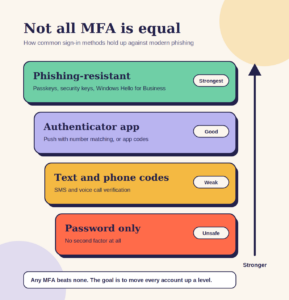
MFA works. That is exactly why attackers go around it.
Microsoft is blunt about this. In its analysis of a large phishing campaign, it noted that the attack was not a vulnerability in MFA at all. Instead, attackers had built a way to let the victim complete MFA themselves, then walk off with the result.
That distinction matters. MFA is not broken. The problem is with the most common forms of MFA, such as a text message code or a tap on a phone. They prove that the right person approved a sign-in. They do not prove the person was signing in to the real Microsoft website.
How attackers get past a second factor
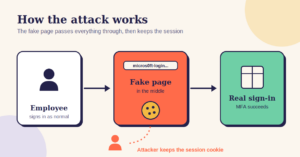
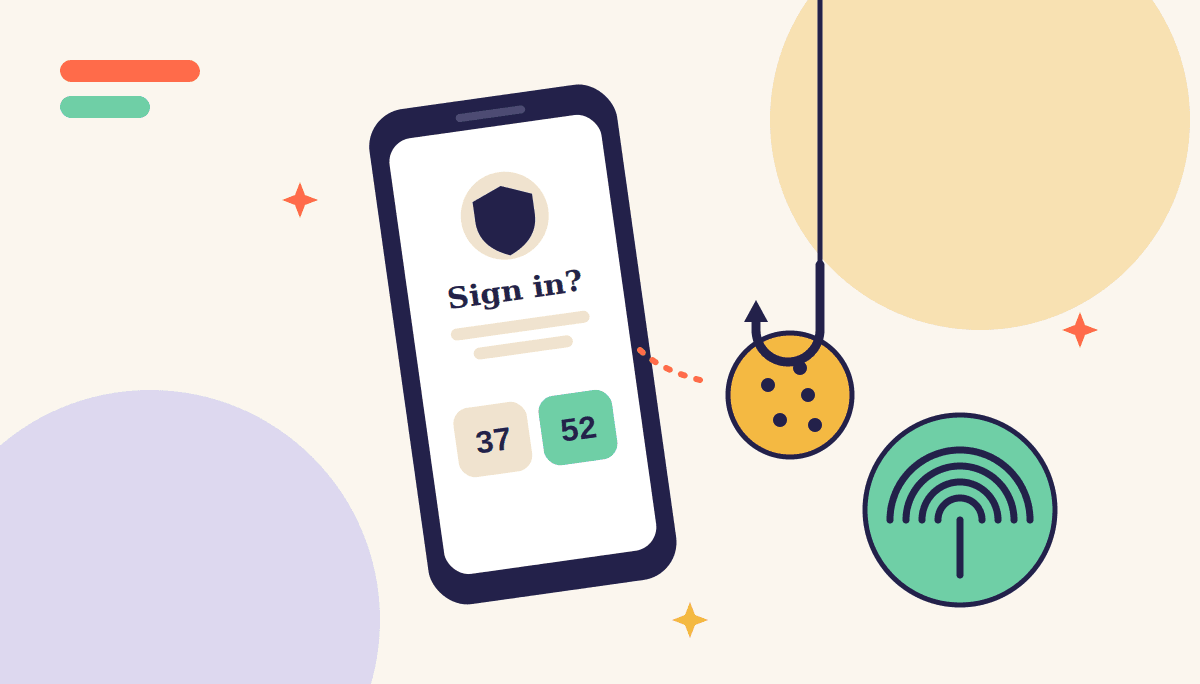
The most effective technique is called adversary-in-the-middle phishing. The victim receives a convincing email and clicks a link to what looks like a Microsoft sign-in page. Behind the scenes, the fake page passes everything through to the real one: the password, the MFA prompt, the approval. The victim signs in normally and sees nothing unusual.
What the attacker captures is the session cookie, the small token that keeps you signed in after MFA succeeds. With it, they can open the mailbox as if they were the user, without needing the password or the phone again. In the campaign Microsoft analysed, attackers used the stolen sessions to read finance-related emails and launch payment fraud against other organizations.
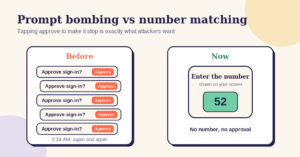
The second technique is MFA fatigue. An attacker who already has a password sends sign-in prompts over and over, often late at night. Eventually, the user taps approve just to make it stop. In May 2023, Microsoft responded by enforcing number matching for Authenticator push notifications. Now users must type a number shown on the sign-in screen instead of simply tapping approve.
The quiet step attackers take next
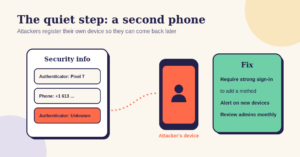
Once inside, a careful attacker tries to stay there. One common move is to register their own phone or authenticator app on the victim’s account. That way, they can sign in again even after the stolen session expires.
In a later investigation, Microsoft described attackers who replayed a stolen session cookie. Because the victim’s MFA policies did not follow best practice, the attackers then added new MFA methods without any challenge.
The lesson for a small business is simple: protect the process of registering MFA methods as carefully as the sign-in itself. If anyone with a valid session can add a new phone, the second factor is only as strong as the weakest session.
Phishing-resistant sign-in closes the gap
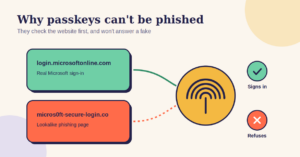
The real fix is a category of sign-in methods called phishing-resistant MFA. These methods check which website is asking before they respond. As a result, a fake page cannot use them, even if the user is completely fooled.
In Microsoft 365, you require these methods with Conditional Access authentication strengths. These let you choose exactly which sign-in methods each group of users can use. That needs Microsoft Entra ID P1, which comes with Microsoft 365 Business Premium.
You do not need to move everyone at once. Start with the accounts that would do the most damage in the wrong hands: administrators, the owner, and anyone who approves payments. Those are exactly the accounts attackers look for first.
What the federal baseline says
The Canadian Centre for Cyber Security publishes baseline controls for small and medium organizations. Strong user authentication is one of its thirteen essential controls. It is a sensible place to anchor your approach when a client or insurer asks how you protect sign-ins.
Insurers in particular have moved beyond asking whether you have MFA. Many now ask how you enforce it and whether it covers every user, including administrators. They also ask whether it applies to remote access. A clear answer that includes phishing-resistant methods for your most sensitive accounts is much stronger than “everyone has the app.”
Thirty days to stronger sign-ins
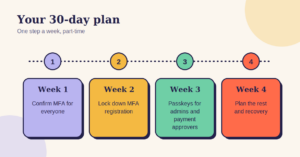
Week one.
Confirm the basics. Make sure every user must use MFA, not just administrators. Also check that text message and phone call codes are not the only option. Check that nobody can approve a sign-in with a simple tap. Number matching should be on for everyone using Authenticator.
Week two.
Protect MFA registration. Require a fresh, strong sign-in before anyone adds or changes a sign-in method. Then set up alerts for when someone registers a new method. Review the methods currently registered for your administrators and remove anything you do not recognize.
Week three.
Move your highest-risk accounts to phishing-resistant sign-in. Enrol administrators, the owner and anyone who approves payments in passkeys, security keys or Windows Hello for Business. Then create a Conditional Access policy requiring phishing-resistant MFA for those accounts.
Week four.
Plan the rest. Decide which roles should move next, and test the experience with a few willing staff. Then write down how someone recovers access if they lose their phone or key. A good recovery process matters as much as the method itself.
That is a month of part-time effort. In return, your business moves from MFA that stops yesterday’s attacks to sign-ins that hold up against today’s.
If you would rather not do it alone, we can help. We review sign-in settings for Ottawa businesses and roll out phishing-resistant MFA for their most sensitive accounts. We also keep it simple enough that staff actually use it.
Book a conversation
Technety is an Ottawa IT consultancy working with small and mid-sized organizations on Microsoft 365, security and day-to-day IT support. This article is general information, not legal advice.
Sources
Microsoft Security Blog: Detecting and mitigating a multi-stage AiTM phishing and BEC campaign
Microsoft Learn: Number matching in MFA push notifications
Microsoft Learn: Conditional Access authentication strengths
Canadian Centre for Cyber Security: Baseline cyber security controls
Related articles
More practical guides on Microsoft 365, security and IT for Ottawa businesses.